Guide · PDF tools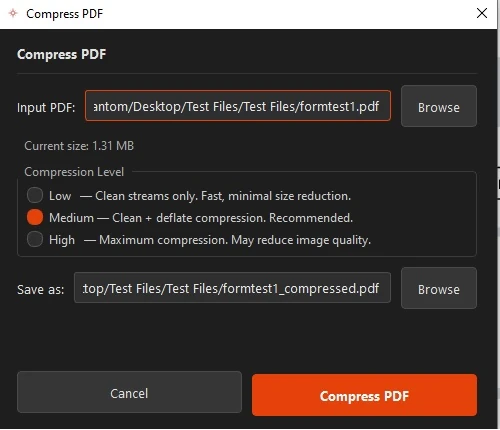
The Compress tool with quality levels 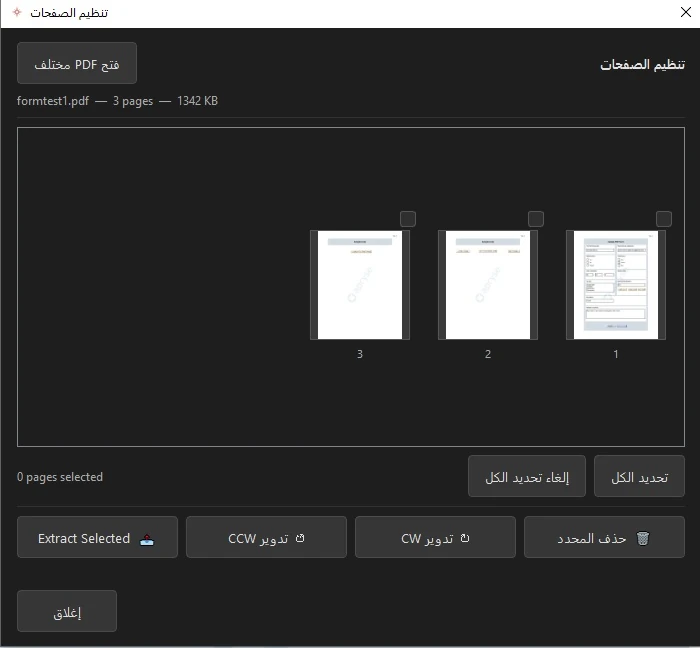
Reordering and organizing pages
How to Compress and Organize a PDF
Two of the most common PDF chores: making a big file smaller, and getting the pages into the right order. Both are built in.
Compress a PDF
Reduce file size for email or upload, choosing how much to compress.
- Open the PDF.
- Open the Compress tool.
- Pick a compression level.
- Save the smaller copy.
Organize the pages
Merge files, split a document, and reorder, rotate, or delete pages.
- Open the page organizer.
- Drag to reorder, or select pages to rotate or delete.
- Merge in another file, or split out a range.
- Save.
See it in action
Related guides: Convert PDF to Word · Best PDF editor
Every PDF essential, in one place
Compress, merge, split, and organize PDFs in AshurReader — offline.
Download for Windows